Software to Centralise Booking.com and Airbnb Messages for UK Hosts
Stop switching between Airbnb, Booking.com, and Vrbo. Manage every guest conversation from a single, unified dashboard and save hours every week.
See HolsUK in Action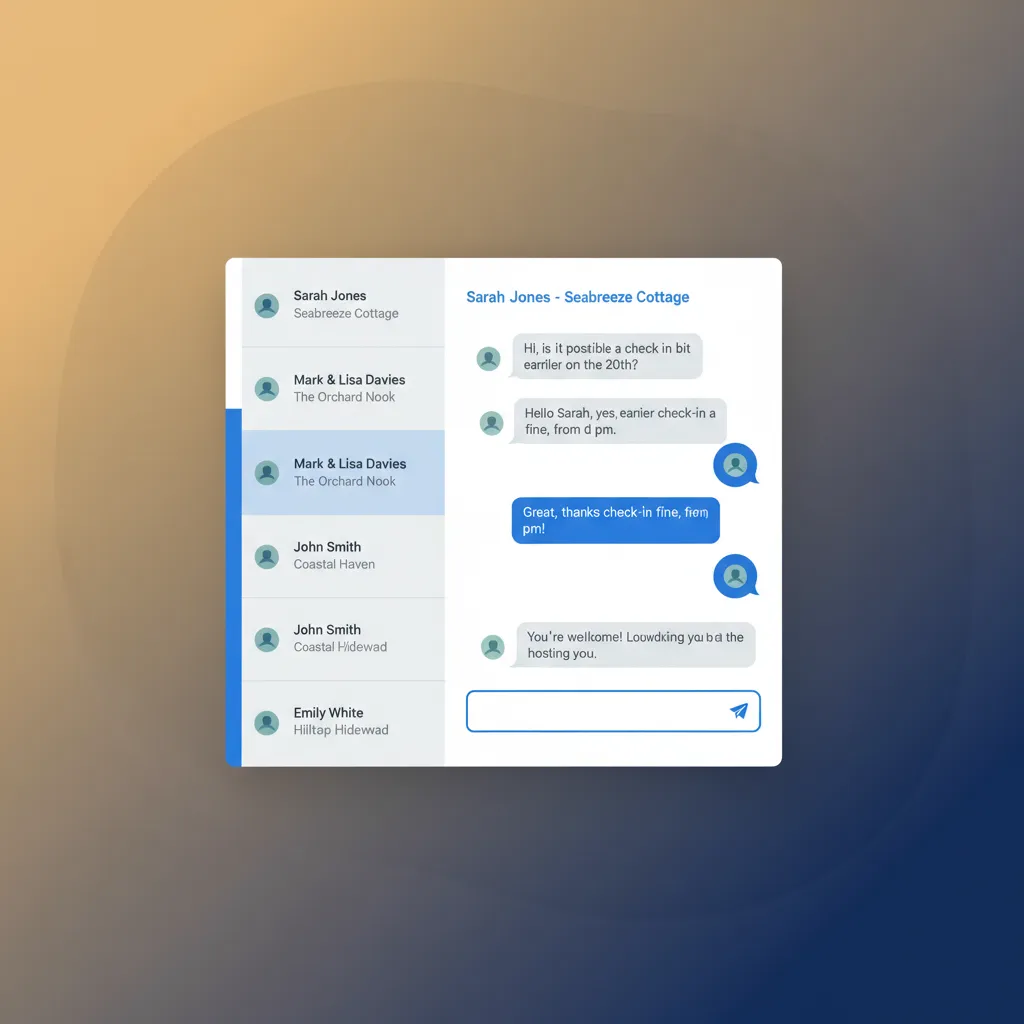
The Daily Scramble of Multiple Inboxes
If you manage even one property on both Airbnb and Booking.com, you know the routine. Your phone pings with an Airbnb app notification. Five minutes later, an email arrives from Booking.com. Then a text from a guest who can't find the key safe. Each platform has its own inbox, its own notification style, and its own performance metrics that depend on your response speed. It's a constant, draining cycle of logging in and out, copying and pasting the same check-in details, and trying to remember which guest is in which property. This isn't just inefficient; it's risky. A missed message overnight can lead to a frustrated guest arriving at a dark property. A slow reply on Booking.com damages your 'Reply Score', potentially lowering your visibility in search results. On Airbnb, response rate is a key factor for maintaining Superhost status. For operators with a portfolio of cottages in the Cotswolds or a string of apartments in Manchester, this problem multiplies. You're either glued to your phone or you risk letting service quality slip, which directly impacts reviews and future bookings. The search for effective software to centralise Booking.com and Airbnb messages is a common operational headache for busy hosts.
A Single, Centralised Guest Messaging Hub
HolsUK solves this problem by pulling all your guest conversations into one place. Our unified inbox connects directly to your Airbnb, Booking.com, Vrbo, and direct booking website accounts. When a guest sends a message on any of these channels, it appears instantly in your HolsUK dashboard, clearly tagged with the source channel and linked to their reservation details. You can reply directly from HolsUK, and your message is sent back to the guest on their original platform. They continue using the Airbnb or Booking.com app as normal, with no idea you're using a central tool. This continuity is key. Our platform is more than just an inbox aggregator; it’s a complete communication tool. You can create and save message templates for frequently asked questions, automate messages to be sent at key moments (like booking confirmation or 24 hours before check-in), and leave internal notes for your team. By providing a single source of truth for all guest communication, HolsUK is the practical software to centralise Booking.com and Airbnb messages, giving you back control and freeing you from the constant app-switching that eats into your day. It’s integrated directly with our calendar sync and cleaner management, creating a seamless operational workflow.
How a Unified Inbox Helps Your Business
Save Hours Every Week
Stop wasting time logging into multiple platforms. By consolidating all messages into one stream, you can process enquiries, answer questions, and manage guest needs far more efficiently. Many hosts find they save several hours a week, time that can be reinvested into optimising listings, marketing, or simply taking a well-deserved break. This isn't about working harder; it's about having smarter, more organised workflows. Centralisation removes the mental clutter and administrative drag of managing separate communication channels.
Improve Your Channel Rankings
Both Airbnb and Booking.com reward hosts for fast response times. A better response rate can improve your visibility in search results, leading to more views and bookings. With a unified inbox and mobile-friendly dashboard, you can reply instantly from wherever you are, without having to find the right app. This simple change in behaviour can have a direct, positive impact on your listing's performance, helping you secure more bookings without spending more on marketing.
Reduce Costly Human Error
When you're rushing between inboxes, mistakes happen. You might quote the wrong price, forget a special request, or give directions to the wrong property. By having the guest's message right next to their booking details—including their name, dates, property, and number of guests—the context is always clear. This single view dramatically reduces the risk of errors that can lead to bad reviews, compensation claims, or even double bookings. It ensures you give the right information every time.
Deliver Consistent, Professional Service
Using saved message templates ensures every guest receives the same high standard of information, from welcome messages to check-out instructions. It professionalises your operation, whether you have one property or fifty. This consistency builds trust and confidence, setting clear expectations and reducing the number of last-minute panic questions. It also ensures that if a team member is covering for you, they are using the same approved, accurate information, maintaining your brand's quality of service.
Gain a Single View of Every Guest
A unified inbox provides a complete, chronological history of every conversation with a guest, regardless of which channel they booked through. Did they ask about pet policies on Airbnb last year and are now booking direct? You'll have that history. This allows for more personal and informed service. You can see past issues, previous requests, and build a better relationship with repeat visitors, fostering loyalty and encouraging those valuable direct bookings in the future.
Core Messaging Features in HolsUK
Unified Multi-Channel Inbox
The heart of our platform. It pulls in messages from Booking.com, Airbnb, Vrbo, and your HolsUK direct booking website. Each message is clearly labelled, so you always know the source. You can filter by channel, property, or read status to stay organised. Reply from one text box, and HolsUK routes your message back through the correct channel's API. The guest experience is completely seamless, while your experience is vastly simplified. It’s built for speed and clarity.
Saved Message Templates
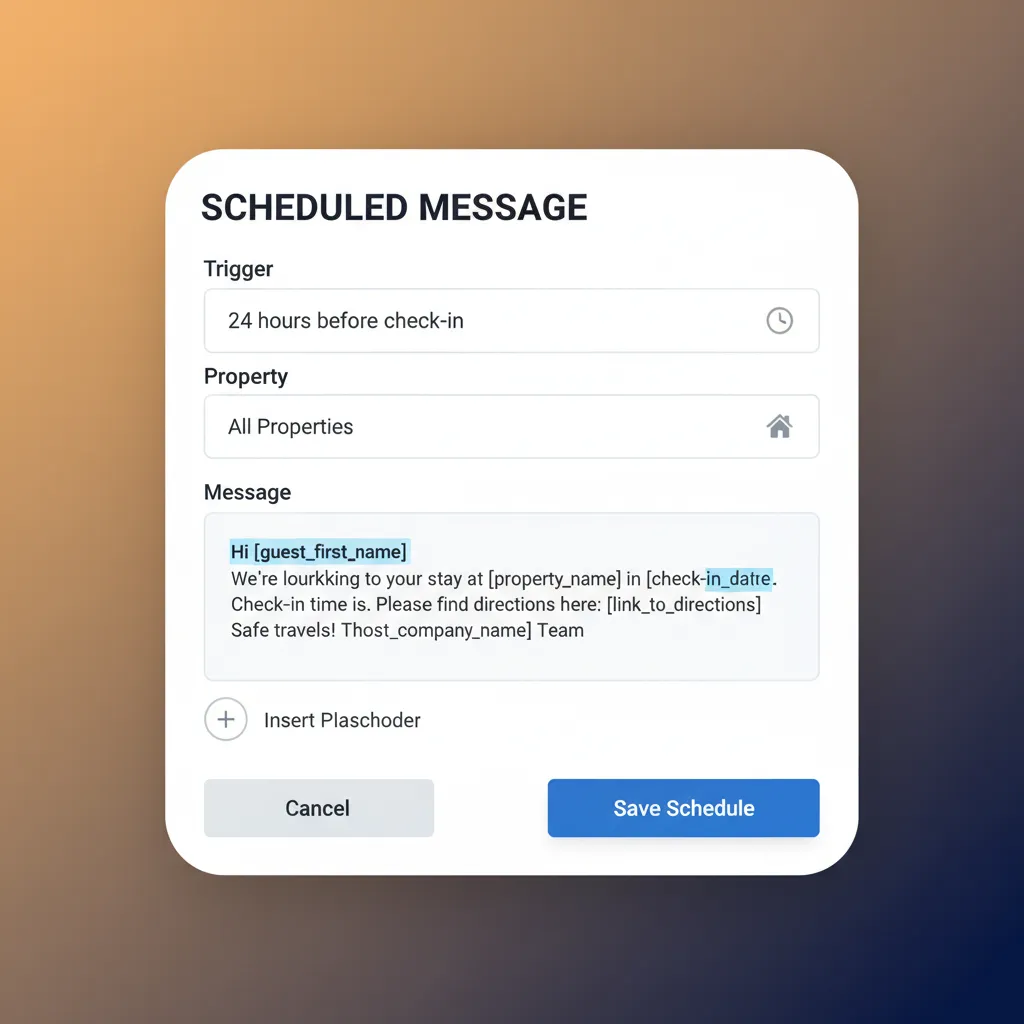
Stop typing the same answers repeatedly. Create a library of saved templates for everything: directions, Wi-Fi codes, local recommendations, check-out procedures, and answers to common questions. You can use placeholders, like `[guest_first_name]` or `[check_in_date]`, to personalise them automatically. A few clicks can save you several minutes per guest, which quickly adds up across dozens or hundreds of bookings per year. It ensures accuracy and consistency in all your communications.
Scheduled & Automated Messages
Automate routine communication to ensure nothing is forgotten. You can schedule messages to be sent at specific times based on booking events. For example, automatically send a welcome message 24 hours before arrival, a 'how is everything?' message on the morning after check-in, and a 'thank you & review request' message after departure. This system works 24/7 to provide excellent service, even when you're busy with other things, improving the guest experience without extra effort.
Full Booking Context
Never ask "which property are you in?" again. When you view a message thread in HolsUK, you see all the relevant booking information alongside it. This includes the guest's name, their stay dates, the property they've booked, the number of guests, and the total booking value in GBP. This immediate context allows you to answer questions accurately and quickly, without needing to cross-reference with your calendar or another system. It makes every interaction more efficient.
Internal Team Notes
Communication isn't just for guests. Within any guest message thread, you can leave internal notes that are only visible to you and your team members. Use this to flag a VIP guest, leave a note for the person on the evening shift about a pending request, or coordinate a response to a tricky situation. It keeps your whole team aligned and ensures everyone has the background information they need to handle guest interactions professionally, without cluttering the guest conversation.
Mobile-First Dashboard
You're not always at your desk. The HolsUK dashboard, including the unified inbox, is designed to work perfectly on your mobile phone or tablet. There's no separate app to download; just log in through your web browser. This gives you the power to manage guest communications from anywhere—whether you're doing a property inspection in the Yorkshire Dales, at the supermarket, or away for the weekend yourself. It provides true flexibility for the modern property manager.
Who Uses Our Unified Inbox?
The Portfolio Owner
A manager with 15 cottages spread across the Lake District lists on Booking.com, Airbnb, and their own direct booking site. They use HolsUK to centralise all enquiries and guest messages. The unified inbox allows them to quickly see which property a message relates to and respond with the correct information using templates. Internal notes are used to coordinate late check-ins with their on-site staff, ensuring a smooth operation even with properties miles apart. It turns a complex communication web into a manageable task list.
The Glamping Site Operator
An operator of six luxury yurts in Pembrokeshire lists on Pitchup, Cool Camping, and takes direct bookings. Guests often have specific questions about facilities or local activities. By funnelling all messages into HolsUK, the owner can provide fast, consistent answers. They use automated messages to send directions and a reminder to bring wellies two days before arrival, which reduces pre-arrival queries and improves the guest experience. The system helps them manage the unique demands of niche travel channels.
The Caravan Park Manager
A holiday park in Cornwall with 50 static caravans and touring pitches uses a mix of channels, including Booking.com for their premium lodges and Pitchup for pitches. The reception team manages the HolsUK inbox. It allows them to handle extension requests, maintenance reports from guests, and new booking enquiries from one screen. Using saved templates for park rules and facility opening times saves the front desk significant time during the busy summer season, freeing them up to deal with on-site guests.
The Part-Time Host
An owner of a single, high-demand apartment in central Edinburgh manages it alongside a full-time job. They rely on HolsUK's automated messaging to handle the bulk of communication. A booking confirmation is sent instantly, check-in details go out the morning of arrival, and a check-out reminder is scheduled automatically. The unified inbox means they can quickly reply to any urgent, non-standard questions during their lunch break without having to log in to multiple apps on their phone.
How HolsUK Compares
There are different ways to manage messaging. Here’s how HolsUK's integrated approach stacks up against doing it manually or using a more basic tool.
| Feature | HolsUK | Typical alternatives |
|---|---|---|
| Unified Inbox | One inbox for Airbnb, Booking.com, Vrbo, and direct bookings. Reply from one place. | Manually switching between multiple websites and apps, leading to missed messages and delays. |
| Message Automation | Schedule messages based on triggers like booking confirmation, check-in, or check-out. | No automation possible. All messages, including repetitive ones, must be sent manually. |
| Connection to Bookings | Messages are automatically linked to reservation details, payment status, and guest history. | No context. You have to manually look up booking details in a separate system. |
| UK-Based Support | Support from a UK team that understands the local holiday let market. | Often reliant on offshore call centres or email-only support with slow response times. |
| Pricing Model | No monthly subscription. A simple, commission-only model on confirmed bookings. | Often involves fixed monthly SaaS fees per property, regardless of your occupancy. |
| All-in-One Platform | Messaging is integrated with channel management, direct bookings, payments, and cleaner scheduling. | Typically a standalone tool, requiring you to patch together multiple different software systems. |
Frequently Asked Questions
How does the unified inbox actually work?+
Our system connects to your channel accounts (like Airbnb and Booking.com) via an official API. This connection allows us to securely pull new messages into your HolsUK dashboard in real-time. When you write a reply in HolsUK, we send it back through the same API, and it appears to the guest as a normal message within their app. It's a two-way sync. This means you get the benefit of a central dashboard without disrupting the guest's experience or violating any channel terms of service. It's a robust and reliable integration.
Does this also centralise messages from Vrbo or my direct booking site?+
Yes. Our unified inbox is designed to be a comprehensive solution. It integrates with major channels including Airbnb, Booking.com, and Vrbo. Furthermore, if you use the HolsUK direct booking website feature, any enquiries or messages sent by guests through your site's contact form will also feed directly into the same unified inbox. This ensures that whether a guest finds you on a major OTA or through your own marketing efforts, you have one single place to manage all communication, providing a truly central hub for your entire business.
What kind of messages can I automate?+
You can automate most of the routine messages that you send for every booking. Common examples include an instant booking confirmation message, a pre-arrival message sent 2-3 days beforehand with directions and access codes, a mid-stay check-up asking if everything is okay, and a post-departure message thanking the guest and asking for a review. You set the rules and the templates, and the system does the rest. This saves a huge amount of time and ensures a consistent, professional experience for every single guest.
Is it difficult to set up my accounts with HolsUK?+
No, the process is straightforward. Our onboarding team will guide you through it. For channels like Airbnb and Booking.com, it typically involves logging into your account and authorising HolsUK as a connected software partner. It doesn't require any technical skill. We provide clear, step-by-step instructions and are on hand to help if you encounter any issues. Most owners are fully connected and have their messages syncing within an hour. Our goal is to make the transition as smooth as possible so you can start saving time immediately.
How does HolsUK's pricing work for messaging?+
The unified inbox is a core part of the HolsUK platform; it is not a separate, paid add-on. We operate on a simple, commission-only basis. This means there are no monthly subscription fees, setup costs, or hidden charges. We charge a small commission on the bookings we process for you. This includes bookings from connected channels like Booking.com and your direct booking website. This model means we only succeed when you do, and it makes our powerful software accessible to everyone, from single-property owners to large-scale managers.
Can I use this as software to centralise Booking.com and Airbnb messages only?+
Yes, while HolsUK is an all-in-one platform, its core strength is centralisation. You can connect just your Airbnb and Booking.com accounts to solve your immediate messaging problem. However, you'll also gain access to our synchronised calendar, which prevents double bookings between those channels. Many hosts start with us to solve the messaging headache and then discover the value of our other integrated tools, like direct booking websites and cleaner management, which are all included within our commission-only structure, with no extra monthly fees.
Ready to Organise Your Guest Communications?
Stop the frantic app-switching and start managing your guest messages the smart way. HolsUK gives you one inbox for every channel, saving you time and preventing mistakes. See for yourself how a centralised system can transform your daily operations and improve your guest experience. Get in touch with our UK-based team today to see a demo or get started.
Get Started with HolsUK