A Centralised Inbox for Airbnb, Booking.com and Direct Enquiries
Bring all your guest messages from Airbnb, Booking.com, Vrbo, and your own website into one simple, organised inbox. No more missed questions, no more app-switching.
Explore the Unified Inbox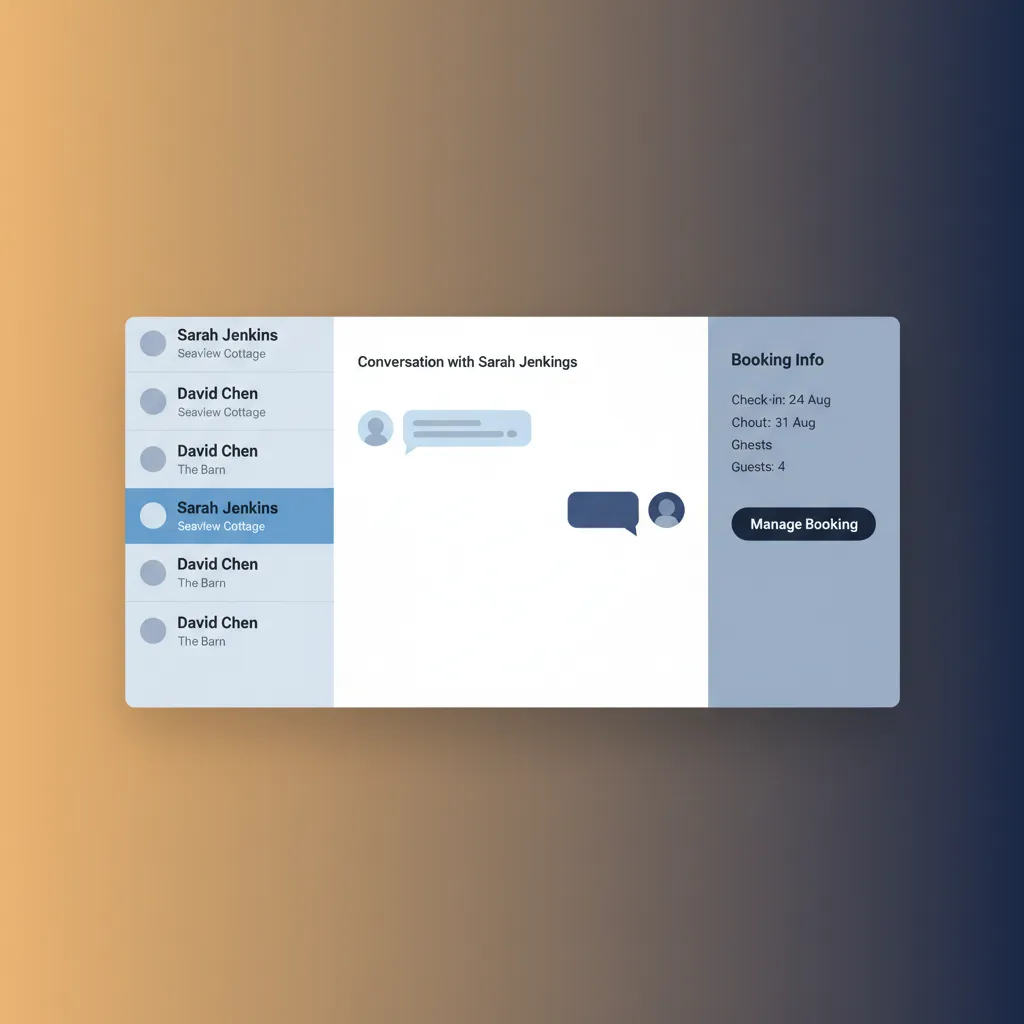
The Daily Scramble of Multiple Inboxes
If you list on more than one channel, you know the routine. A notification pings from the Airbnb app – a guest asking for the Wi-Fi code. A minute later, an email arrives from your website booking form with a question about wheelchair access for a potential booking. Then, the Booking.com Pulse app buzzes with a last-minute query about late check-in. Each platform has its own interface, its own notification system, and its own rules for response times. This constant context-switching isn't just inefficient; it's a genuine business risk. It's easy to lose track of a conversation, leading to a slow reply that damages your ranking on the OTA, or worse, a completely missed message that results in a lost booking or a negative review. You might find yourself searching through emails to remember if the guest in 'Seaview Cottage' this weekend is the one who needed a travel cot, or if that was the guest from last week. This juggling act eats into your day, creates unnecessary stress, and makes delivering consistently excellent guest service far harder than it needs to be. For a professional operator, this lack of a single source of truth is simply not sustainable, especially during peak season in busy spots like Cornwall or the Lake District.
One Feed to Rule Them All
HolsUK solves this fragmentation with a single, unified inbox built directly into our platform. We don't use unreliable email forwarding or clunky workarounds. Instead, we connect directly to the official APIs of major channels like Airbnb, Booking.com, and Vrbo. This means every guest message, from every connected channel, flows into your HolsUK dashboard in real-time. Enquiries from your HolsUK direct booking website also land in the exact same place. When you reply from the HolsUK inbox, your message is sent directly back to the guest on the platform they used to contact you. The guest in the Airbnb app gets a reply in the Airbnb app; the Booking.com guest gets a reply through their system. They have no idea you're using a central tool – the experience is seamless. Crucially, every message is automatically linked to the relevant booking and guest profile. You can see their name, their stay dates, the property they've booked, and how much they've paid, all right next to the conversation. This provides the context you need to give fast, accurate, and personal replies without ever leaving the page. It transforms guest communication from a chaotic chore into a streamlined, professional process, creating a true centralised inbox for Airbnb, Booking.com and direct enquiries.
How a Unified Inbox Helps Your Business
Improve Your OTA Ranking with Faster Replies
Platforms like Airbnb and Booking.com explicitly track and reward hosts for fast response times. By having all messages in one place, you eliminate the delay caused by switching between apps. You can see and action a new message instantly, whether it’s from Vrbo or a direct enquiry. Consistently replying faster than your competition can directly contribute to better visibility in search results, helping you achieve and maintain statuses like Airbnb Superhost or Booking.com's Preferred Partner Programme. It's a simple operational improvement that delivers a tangible commercial advantage.
Prevent Lost Bookings and Bad Reviews
A missed message is often a lost opportunity or a future problem. A pre-booking question that goes unanswered for hours means that potential guest has likely already booked with a more responsive host. A mid-stay request that gets overlooked can easily turn a minor issue into a public 1-star review. A centralised inbox provides a single to-do list for all communications. Nothing gets lost between apps or buried in a personal email account. This comprehensive oversight ensures every guest is heard, every question is answered, and your reputation for excellent service is protected.
Gain Hours Back Every Week
Think of the time spent logging in and out of different platforms, re-reading message threads to find context, and typing out the same answers to common questions. A unified inbox, especially when combined with saved reply templates, automates the repetitive parts of guest communication. Directions, key-safe codes, Wi-Fi details, and local recommendations can all be sent in two clicks. This efficiency compounds, saving many owners several hours a week – time that can be reinvested in optimising pricing, marketing, or simply enjoying a better work-life balance.
Establish a Single Source of Truth
When a guest calls you, there's no need to ask "Did you book on Airbnb or our website?" and then start frantically searching. With HolsUK, you can simply search their name and see the entire communication history, across all channels, in one chronological thread. This is invaluable for resolving disputes, clarifying agreements (like an agreed early check-in), and ensuring a smooth handover if you work with a partner or a virtual assistant. It creates a complete, auditable record of every guest interaction, from initial enquiry to post-stay feedback.
Deliver a More Professional Service
Quick, informed, and accurate responses signal to guests that they are dealing with a professional operator. When you can instantly answer a question by referencing booking details right next to the message, it builds confidence and sets a positive tone for the entire stay. This level of organisation is difficult to achieve when juggling multiple apps. By using a centralised inbox for Airbnb, Booking.com and direct enquiries, you present a polished, reliable front to every guest, which encourages repeat bookings and word-of-mouth referrals.
The Tools You Need to Manage Conversations
True Two-Way Channel Sync
Our inbox doesn't just pull messages in; it pushes your replies back out. Using official API connections with Airbnb, Booking.com, and Vrbo, your responses from HolsUK are delivered natively to the guest on their original platform. This maintains the integrity of the conversation history on the OTA and ensures your response time metrics are accurately recorded. It's a seamless, two-way synchronisation that works silently in the background, keeping everything in one place without compromising the guest experience or your channel performance.
Saved Reply Templates
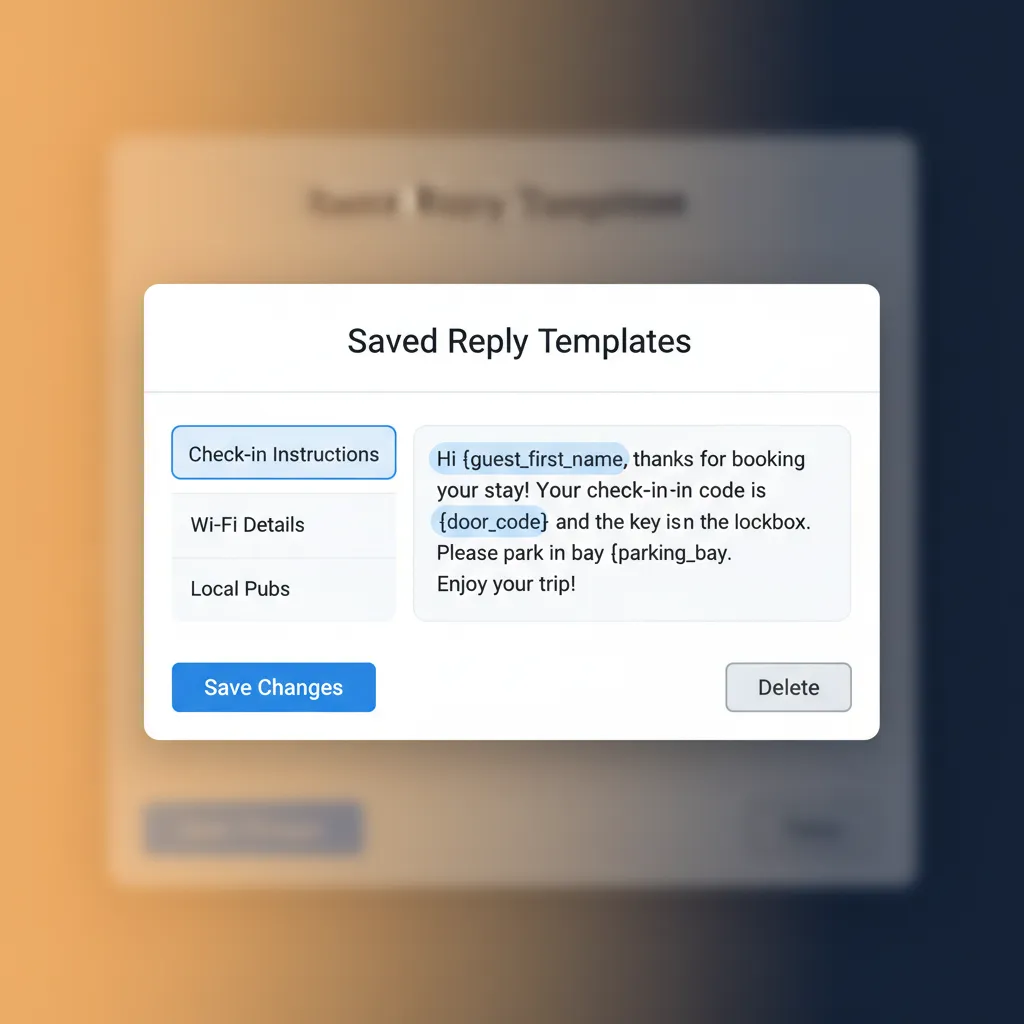
Stop typing the same answers repeatedly. Create and save templates for your most common enquiries. Organise them into categories like 'Pre-Arrival', 'Check-in', or 'Local Info'. With one click, you can insert a perfectly worded response, complete with directions, access codes, or appliance instructions. You can even use placeholders like {guest_first_name} or {check_in_date} to personalise them automatically. This feature alone is a massive time-saver, ensuring consistency and accuracy across all your guest communications, day or night.
Automated Scheduled Messages
Proactively communicate with guests without lifting a finger. HolsUK allows you to schedule messages to be sent automatically based on booking events. For example, you can set up a message to send 7 days before arrival with directions and pre-stay information. Or, schedule a message for the morning of check-in with the key-safe code, and another on the morning of check-out with departure instructions. This reduces your manual workload and ensures guests always have the information they need, exactly when they need it.
Full Booking and Guest Context
Never ask "which property are you in?" again. Every message thread in the HolsUK inbox is displayed alongside a summary of the booking. You can instantly see the guest's name, the property they've booked, their check-in and check-out dates, the number of guests, and their payment status. This immediate context allows you to reply with confidence and accuracy, providing a far more personal and efficient service. It eliminates guesswork and the need to cross-reference information in other systems before you can answer a simple question.
Direct Booking Website Integration
Your direct booking strategy is fully supported. All enquiries and messages sent through your HolsUK-powered website appear in the unified inbox alongside your OTA messages. This treats your most profitable booking source as a first-class citizen, ensuring direct guests receive the same prompt and professional service. By managing direct and OTA comms in the same workflow, you can easily handle availability questions, process direct payments via Stripe, and build a relationship that encourages them to book direct again next time.
Internal Notes for Team Collaboration
If you work with a partner, a virtual assistant, or a cleaner, you can add private notes to any conversation thread. These notes are only visible to you and your team, not the guest. Use them to leave instructions ('Remember to leave the high chair for this guest'), record important details ('Guest called to say they will be arriving at 10pm'), or manage handovers. This keeps your entire team on the same page and ensures important operational details are attached to the relevant booking and conversation.
Who is our Unified Inbox for?
The Multi-Property Owner
You manage a portfolio of three cottages in the Cotswolds and two apartments in Bath, listed across Airbnb, Vrbo, and your own website. Juggling five properties on three channels is impossible without a central system. The unified inbox allows you to see all guest communication in one feed, sorted by the most recent message. You can quickly filter by property to focus on one location or deal with all urgent enquiries at once, saving hours of administrative time and ensuring a consistent standard of service across your entire portfolio.
The 'Side-Hustle' Host
You run a single shepherd's hut in your garden in rural Wales, but you have a full-time job. You can't be glued to your phone all day. The unified inbox, combined with saved replies and scheduled messages, is critical. You can set up automated messages for check-in details and answer common questions instantly with templates, even on your lunch break. This allows you to run a professional-quality holiday let and maintain Superhost status without it taking over your life, ensuring your side-business remains profitable and manageable.
The Hands-On B&B/Guesthouse Operator
You and your partner run a 6-room guesthouse in the Scottish Highlands, taking bookings from Booking.com, Expedia, and your direct site. The phone is always ringing, and the inbox is always full of questions about breakfast times, parking, and local walks. A centralised system lets you manage all digital enquiries from one place, whether you're at the reception desk or in the kitchen. It brings order to the constant flow of communication, ensuring no online enquiry gets missed during a busy check-in period.
The Glamping or Caravan Park Manager
You operate a site with 20 pods and 50 touring pitches, listed on Pitchup, Cool Camping, and your own site. The volume of enquiries about pitch sizes, electric hook-ups, and group bookings is significant. A unified inbox allows your reception team to work from a single, shared screen to manage all incoming messages. Using internal notes, they can coordinate responses and ensure every potential guest gets a prompt, accurate answer, maximising occupancy across all your different types of accommodation.
How HolsUK's Inbox Compares
There are several ways to tackle guest messaging. Most hosts start with individual apps and emails, but quickly find the limitations. Here’s how a dedicated, integrated platform like HolsUK stands apart.
| Feature | HolsUK | Typical alternatives |
|---|---|---|
| Message Sync | True two-way API synchronisation with Airbnb, Booking.com, and Vrbo. Replies sent from HolsUK appear natively on the channel. | Rely on separate apps for each channel, or use brittle email forwarding rules that often break and don't allow replies. |
| Booking Context | Every message is automatically linked to the guest's booking data, showing dates, property, and payment status. | No context provided. You have to manually find the booking in another app or system to answer questions. |
| Direct Bookings | Direct booking enquiries from your HolsUK website are fully integrated into the same unified inbox. | Direct enquiries arrive in a separate email inbox, creating yet another stream to manage and increasing the chance of missed messages. |
| Automation | Includes saved reply templates and rule-based scheduled messages (e.g., 24 hours before check-in). | No automation. Every message must be typed and sent manually, leading to repetitive work and inconsistent information. |
| Team Access | One central login for you and your team. Internal notes allow for private collaboration on guest conversations. | Requires sharing personal logins for OTA accounts, which is insecure and difficult to manage. |
| Cost Model | Included as a core feature of our simple, flat monthly subscription. No per-message fees or commissions. | Either 'free' but chaotic (using apps) or part of enterprise-level systems costing hundreds of pounds per month. |
Frequently Asked Questions
Is this a true two-way synchronisation?+
Yes, absolutely. We use official API partnerships with the channels. When you reply to an Airbnb message in HolsUK, your response is sent via the API and appears in the guest's Airbnb message thread just as if you'd sent it from the Airbnb app itself. The same applies to Booking.com and Vrbo. This is crucial for ensuring your response time metrics are tracked correctly by the OTAs and for providing a seamless experience for the guest. It's not a simple email forward; it's a deep, reliable integration.
Which booking channels do you connect with?+
Our unified inbox has full two-way integration with the biggest names in the industry: Airbnb, Booking.com, and Vrbo. We also, of course, fully integrate with the direct booking engine that comes with your HolsUK website. This combination covers the vast majority of bookings for most independent UK holiday let owners. We are always evaluating new channel integrations based on demand from our user base, but our focus is on providing deep, reliable connections with the channels that matter most to your business and bottom line.
What happens if a guest phones me?+
While the unified inbox manages your digital communications, we know guests still pick up the phone. Our platform provides a solution here too. You can easily find the guest's booking in HolsUK and add a private 'internal note' to their conversation history. For example, 'Guest called at 2pm to confirm they are bringing a dog'. This creates a record of the conversation, attached to the booking, so you or your team have the full picture, even if part of the communication happened offline. It keeps all information in one place.
Can I use the inbox on my mobile phone?+
Yes. The HolsUK platform is designed to be fully responsive, meaning it works effectively on desktops, tablets, and mobile phones. You can access your centralised inbox through the web browser on your smartphone, allowing you to read and reply to guest messages on the go. There's no need to download a separate app. As long as you have an internet connection, you have full access to your messages, booking calendar, and guest details, whether you're at your desk or out changing over a property.
How does the centralised inbox handle a new enquiry versus a message from a confirmed guest?+
The system clearly distinguishes between the two. A new enquiry, often from a channel like Vrbo or your direct website, will appear in the inbox and be flagged as a pre-booking question. It will show the requested dates and property. A message from a guest with a confirmed booking is automatically linked to their existing reservation details. This allows you to prioritise answering new leads to secure bookings, while also having all the context you need to service your confirmed guests efficiently, all from within the same interface.
How are messages from different properties organised?+
If you manage multiple properties, the unified inbox is designed to keep you organised. By default, it shows a single list of all conversations from all properties, sorted by the most recent activity. However, you can easily use filters to view messages for just one specific property. For example, if you're heading to 'The Old Stables' to prepare for an arrival, you can filter the inbox to see only messages related to that property. This allows you to focus your attention where it's needed most.
Ready to Organise Your Guest Communications?
Stop letting your inbox dictate your day. Take control with a single, powerful platform that brings all your guest conversations together. Save time, reduce stress, and give your guests the professional service they deserve. HolsUK gives you the tools to run your holiday let business more efficiently, starting with a truly unified inbox. Start your free trial today and see the difference it makes.
Start Your Free Trial